

Android Jetpack Compose - Is Declarative Framework the Future of UI App Development?
Android Jetpack Compose: Embracing the Future of UI App Development with Declarative Framework.
Building an app ‘the old way’
By ‘old way,’ we mean the imperative framework based on Views. So far, it has been the most common paradigm. It involves having a separate codebase for the app’s UI. The paradigm describes computation in terms of statements that change a program state (its UI). Simply speaking, you tell the compiler what you want to happen step by step. The imperative paradigm mainly focuses on the how rather than the what. In most cases, building native UIs for Android means creating multiple XML files with nested View trees.
Why is imperative, event-driven programming problematic?
In this model, every UI component keeps track of its state. This state can change in response to any number of events. When we have multiple features and events, we create a web of code dependencies that is hard to manage. Often, you’ll find that changing a single event can produce unwanted side effects on multiple components. Maintaining a coherent state for the entire screen can sometimes prove difficult.
UI programming in the imperative paradigm boils down to filling the gaps between XML layout definitions and the app code base (Java/Kotlin). Developers must keep track of all the view instances and update them so the user can see the current data. If they want to create complex widgets (Custom views), they must implement them using both XML syntax and Java/Kotlin. That’s a lot of code, even for simple widgets, which seems counterproductive.
Is there an alternative out there?
For many years, developers all over the world have created multiple tools that have made building native UIs easier:
1. For getting a view object instance: findViewByld, ButterKnife, Kotlin Synthetic, and View binding.
2. For updating a view: data binding with observables.
However, it’s the declarative pattern that has really made a difference.
Building an app ‘the new way’ using the declarative model
Declarative UI is an emerging trend that allows programmers to design the UI statelessly. At the same time, the imperative paradigm focuses on how the declarative paradigm focuses on the what. The trend began in 2013 with React Native, which started as a Facebook hackathon project. Its main idea was to improve the developer experience by bringing rapid development, instant reload, and platform agnosticism to mobile app development. Google had similar ambitions. Their goal was to get web development concepts to mobile. As a result, they came up with Flutter and Dart, which speed up the creation of responsive layouts in Flutter development. And while Flutter is well-liked, most developers have recently started to gain experience with native frameworks.
What is a declarative UI?
The pattern defines the UI as a function of the state (a variable or an object that holds a value that can change depending on user input). Every time the state changes, the framework redraws the UI — no need to modify it manually. You declare what to show in each state, and the framework will show the matching UI for the current state. Compared to imperative programming, with the declarative approach, you describe the desired result without explicitly focusing on all the steps needed.
When it comes to the tools mentioned above, Jetpack Compose has turned out to be the end of the ‘building-the-app-old-way’ nightmare. The framework was designed to simplify the entire process and unify the code base to use Kotlin only. No more instance-related issues and updates. Compose has got you covered. All you need to do is take care of the state updates.
Why choose Jetpack Compose?
Let’s start with a short explanation of what Jetpack Compose is. It’s an Android modern toolkit for building native UIs. This toolkit simplifies and accelerates the UI development of Android apps. It enables developers to create screens declarative while writing a lot less code. It was announced by Google in 2019 and released as alpha in August 2020. In June 2021, version 1.0 was finally here. Sure, you can still use the XML-based UI toolkit but compared to Compose, it requires a lot more effort to create something worthwhile. Below you will find essential advantages of Jetpack Compose:
1. UI state management is easier than ever. The tool automatically updates the UI to match the current state object value. No manual work is involved – you can forget about “observing” stuff on the UI.
2. You no longer need multiple XML files and classes to create a rich UI. You write simple functions in a single Kotlin file.
3. Interoperability – you can use the toolset within projects that use the existing XML layouts. Compose is fully compatible with Views, Fragments, and Activities. It is relatively easy to integrate with old SDKs.
4. It supports Material Design themes, components, and animations out of the box. Therefore, you can focus on creating stunning and appealing interfaces quickly. You can create your animations using animation modifiers that are much more robust than the old View Animation API.
5. Jetpack Compose is part of the Jetpack library, meaning that most popular libraries (like Navigation) are Compose-ready from the beginning.
6. The Preview feature – you can easily preview all new components using the Preview Panel in Android studio. You can even simulate animations and interactions in an emulator-like environment.
7. Accompanist library – a birthplace of Google’s Compose supporting components. Once tested, they will appear in the Jetpack Compose library. Many 3rd party libraries, such as Koin or Coil, have also started to support Compose.
How to work with Compose?
Jetpack Compose makes building Android UI faster and easier. It enables you to bring your app to life with less code, powerful tools, and intuitive Kotlin APIs. Here are the most important things to know when working with Jetpack Compose:
1. Each component or screen you create in Compose must be a composable function. These are simple Kotlin functions marked with @Composable annotation.
2. Screens are built using other, smaller composable functions. Think of every composable part as you would of a Lego block. The more universal the league, the easier it will be to mix N match with other blocks.
3. You can access multiple new APIs representing well-known widgets within a composable function scope — for example, Row, Column, Image, Text, etc.
4. If a state object used by a composable is updated, a recomposition process will be triggered. This process will re-render only those components affected by the state change. A state can be any object decorated by the state class. If needed, calculated states can be saved in between recompositions thanks to the ‘remember { }’ block.
5. LiveData or Flow streams are also a viable alternative for a State class and remember a block.
6. Compose allows you to inject dependencies as parameters of composable functions.
7. Each composable function grants you access to the app Resources. If you need localized text, go with ‘stringResource(Int)’. If you need context, use ‘LocalContext.current’.
8. Using Jetpack Navigation, you can navigate between functions (which can be screened in Compose). The Navigation is mainly based on deep links.
How we have used Jetpack Compose – case studies
fun TitledSection()
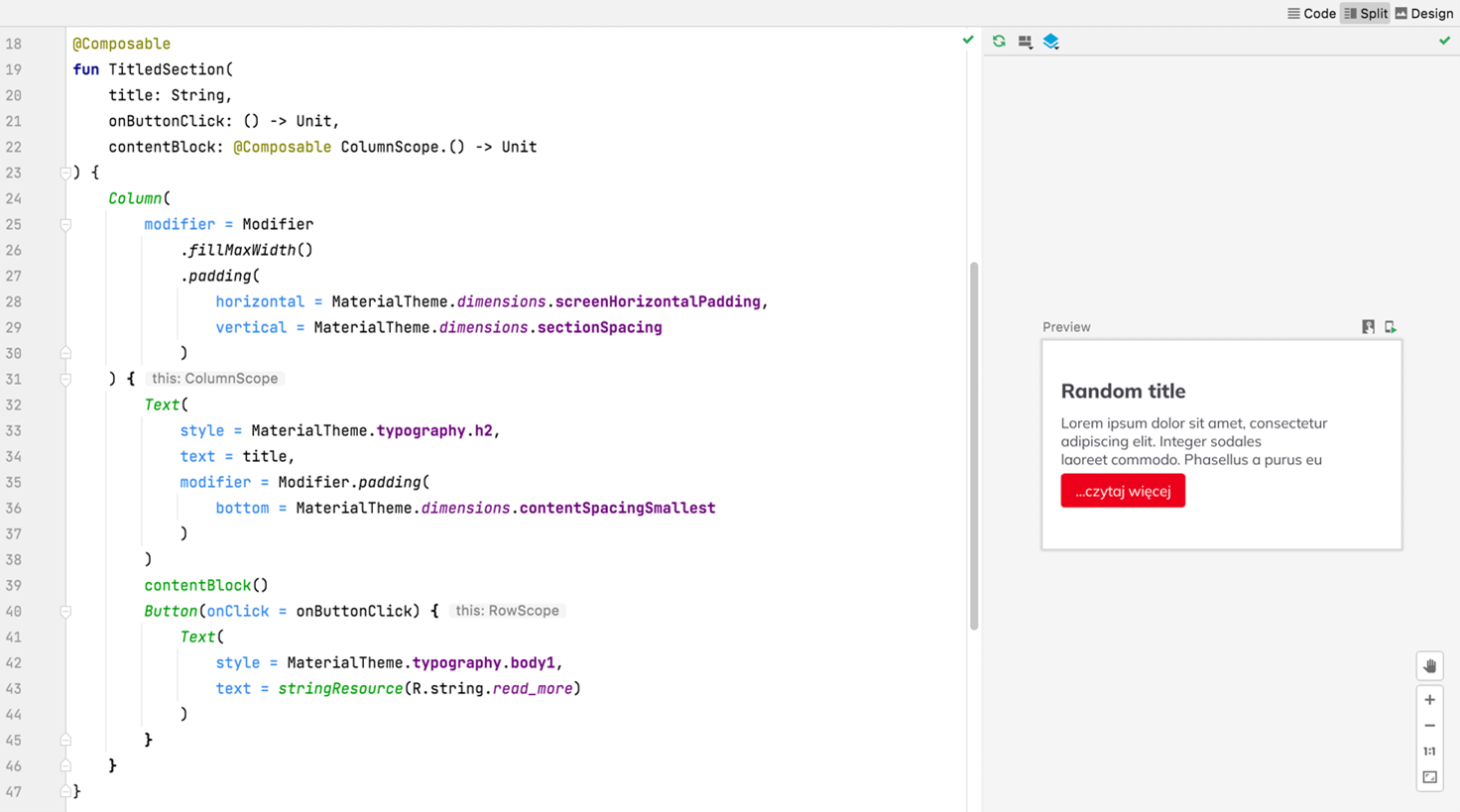
We have used a simple composable function consisting of Text and a Button within a Column. We call between Column components a composable block, a parameter of TitledSection. This allows us to create multiple cohesive sections with titles, content, and a CTA button. It has never been easier to reuse components in different contexts while ensuring the look is consistent.
fun TitledSectionList()
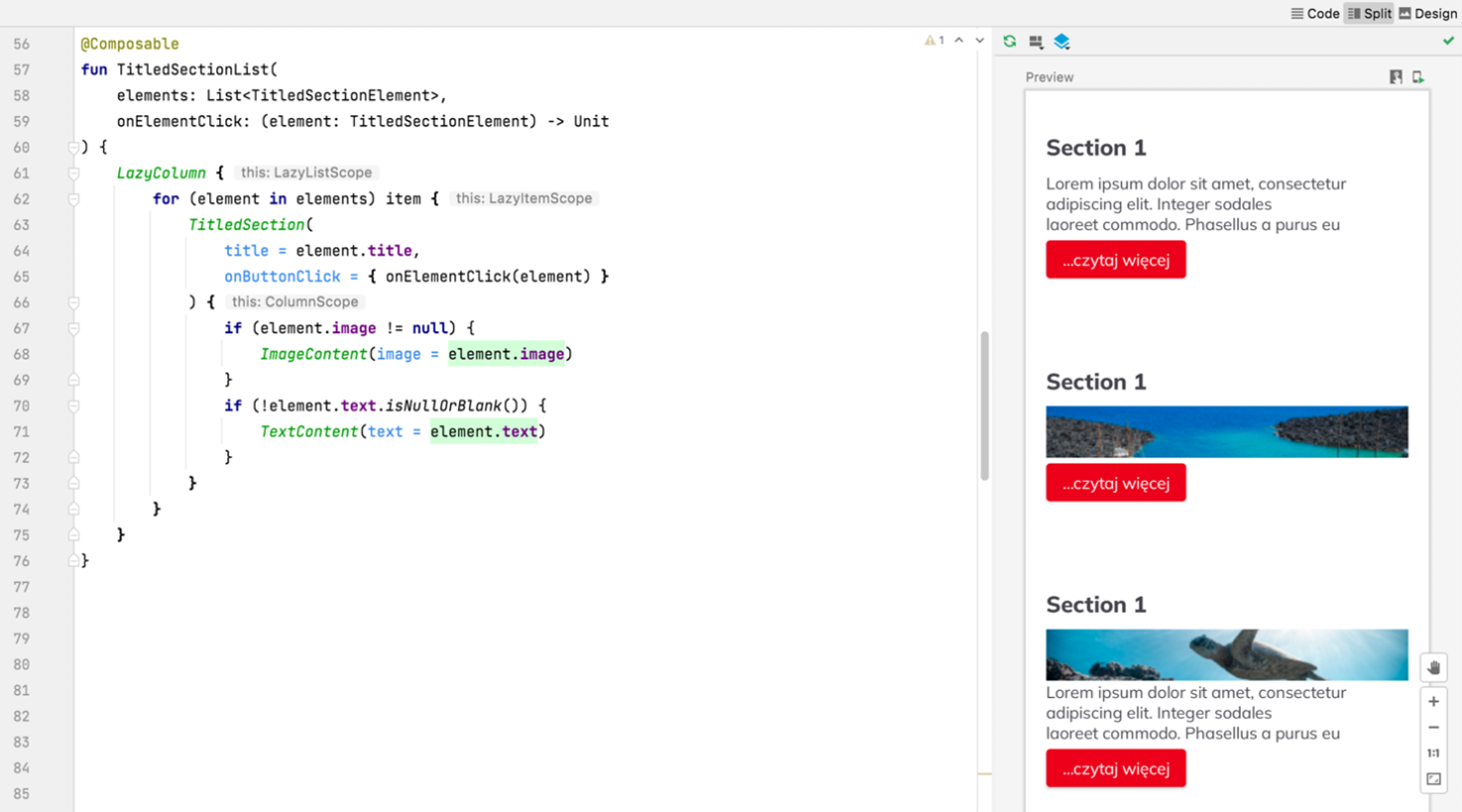
Until Compose showed up, the only way to create a list with multiple views was to create a view holder for each of them and then attach them to a RecyclerView via an adapter. In Compose, we can use LazyColumn. Inside this column, we can switch between composable functions that represent elements we want to show based on an Enum, for example. You don’t even have to worry about a LayoutManager or keeping track of multiple XML files for all the view holders. Adapters also are a thing of the past.
State hoisting
State hoisting is a process of decoupling the state from a composable function. You can see how it’s done in the examples above. As you can see, a composable part doesn’t know anything about the state of the data it displays. Such composable functions also don’t alter the state of the data. Instead, we expose callbacks as lambdas and let the function’s caller make the necessary adjustments. This way, our composable functions are even more flexible and reusable.
Summary
Today, Jetpack Compose is almost one year old. It is becoming increasingly popular among developers, and many trusts Compose enough to use it in production code. It makes UI development more accessible than ever, and it’s impossible not to fall in love with it! On the other hand, building layouts using XML feels clumsy and outdated. The king is dead, long live the king!
More from Insights






Maximizing Business Impact with UX: How Service Safari Elevates Customer Experience at ITAKA Travel Agency


Data Management: How to Use Software to Organize and Analyze Your Business Data

Boosting Conversion Rates with Strapi Headless CMS: A Winning Combination

The Role of Project Management in Managing Remote Software Development Teams











Third-Party Cookies Are Soon to Be Gone. Instead, First-Party Cookies Are the Way to Earn Customers’ trust.


Workation in Thailand Seen “Through the Eyes” of Our UX/UI Designer – Angelika

Why is Flutter a High-Performance Framework for Application Development?